Secure login for EK333 players

Logging in to Casino EK333 opens access to your balance, bets, withdrawals in BDT and all personalised settings. This guide explains where to find the login button, how to sign in from phone or PC, what to do if the password does not work and how to keep your account safe with 2FA and basic security rules.

Why EK333 login matters

Account login on Casino EK333 is more than a simple button. After authorisation you see your real balance in BDT, open deposits and withdrawals, check betting records and control personal limits. Without correct login you cannot trigger fast payouts to bKash or Nagad or claim loyalty rewards.

For new players it is useful to separate two actions. Registration creates an account, and login gives daily access to it. If you only plan to sign up, you can later read about the process in the section registration on Casino EK333, but this page focuses exactly on the login flow and typical issues.

Once you sign in, the top menu changes and shows shortcuts to Deposit, Withdrawal, Reward Center, Invite Friends and Personal Center. This saves time when you switch between casino games, sports bets and account management.

Where to find the EK333 login button

On desktop Casino EK333 keeps the Login button in the top right corner of every public page. It sits next to the Register button, so you can quickly choose between creating a new profile and entering an existing one.

In the mobile browser layout the same button moves into the top bar. It is still visible without scrolling, which is important if you often visit EK333 from smartphones common in Dhaka, Chittagong or Sylhet.

After login the button disappears, and instead you see your avatar or phone number. Clicking this avatar opens the account menu with betting history, account records, internal messages and the Sign out link.

Structure of the login form

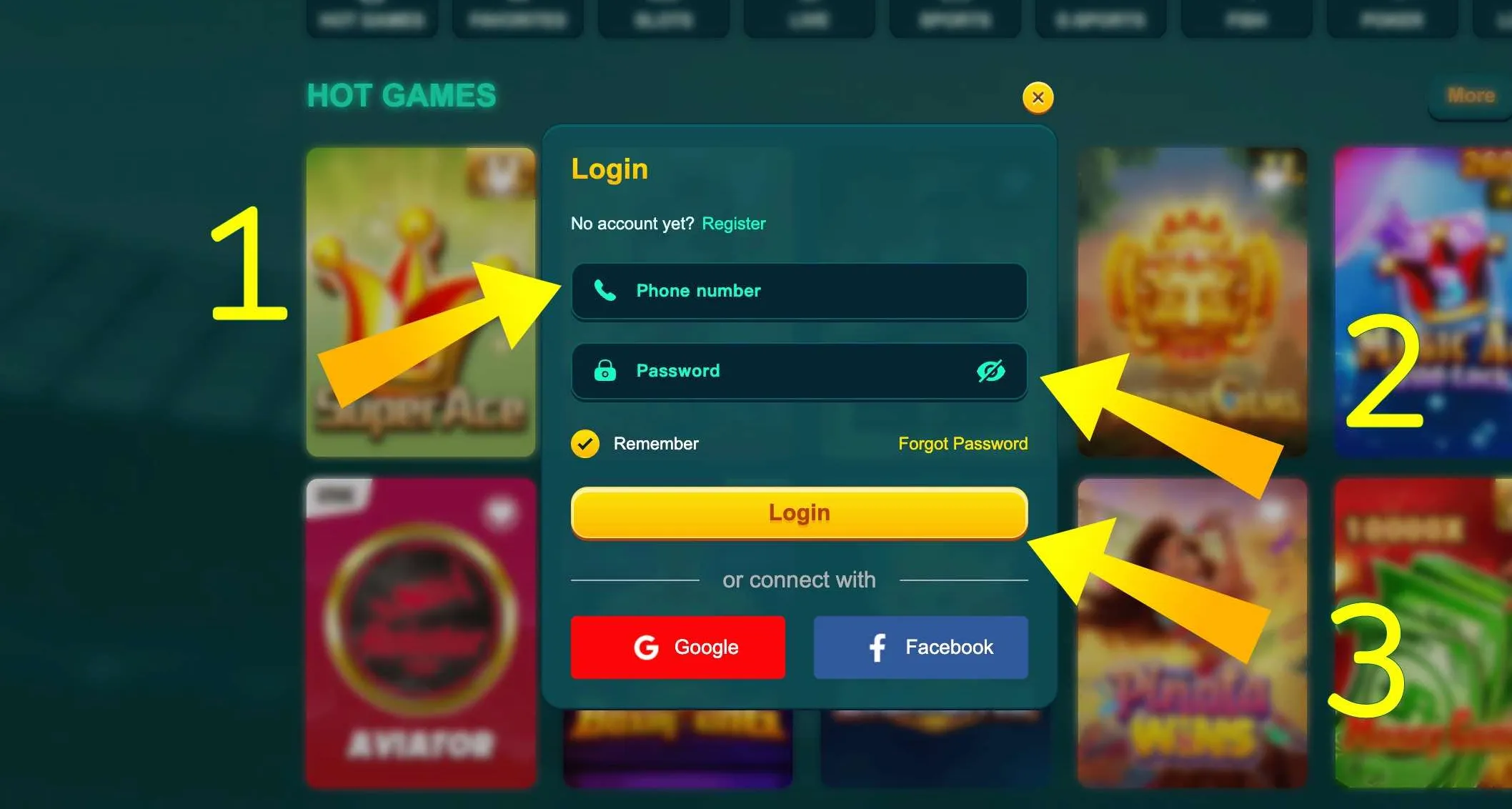
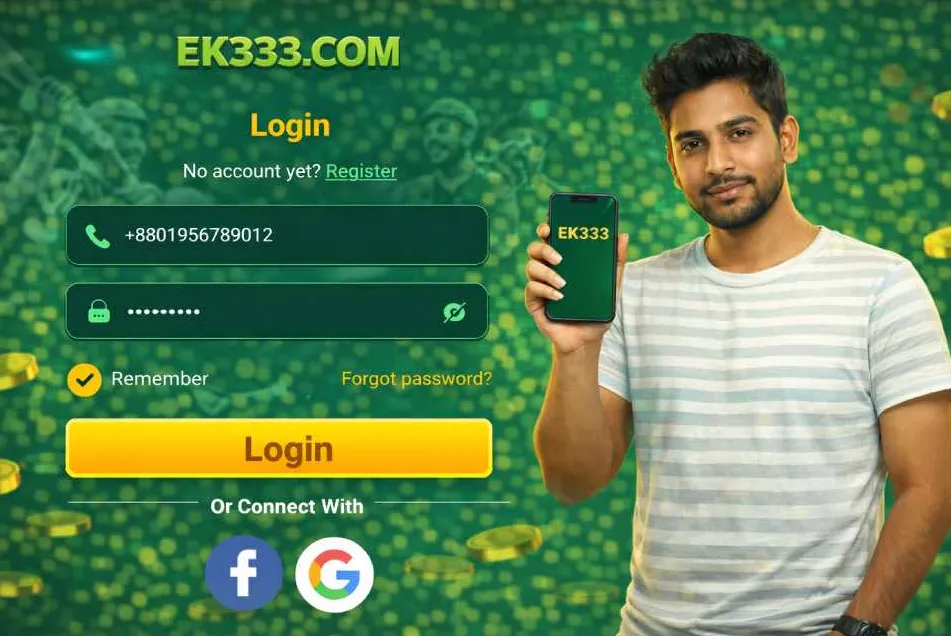
When you press Login, EK333 shows a compact authorisation form. It usually contains:

  • Field for mobile number used during registration
  • Password field with an eye icon to show or hide characters
  • Checkbox Remember me to keep the session on your device
  • Main Login button at the bottom
  • Links for Forgot password and alternative sign in via Google or Facebook

The system uses the same layout on web and inside the mobile application, so after first experience you will feel the interface familiar everywhere.
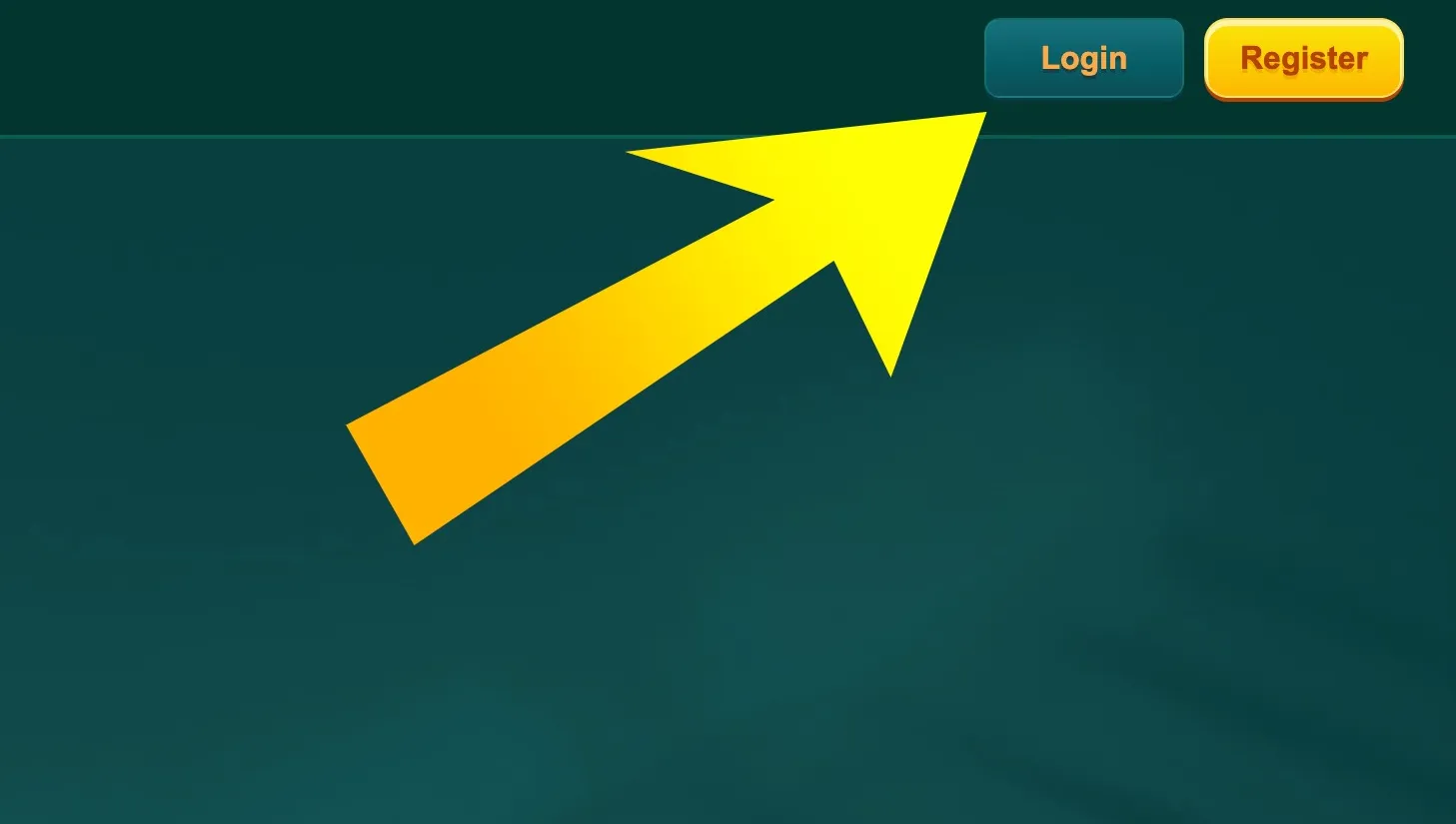
EK333 login button highlighted

On EK333 desktop site the Login button is in the top right corner. Click it to open the sign in form before placing any bet.

Ready to continue your game on Casino EK333 - open the login page and sign in to your verified account in a couple of taps.

Step by step EK333 login on website

  1. EK333 login form on web

    Open the official EK333 site and press the Login button in the top right corner. The authorisation window will slide out with fields for mobile number and password.

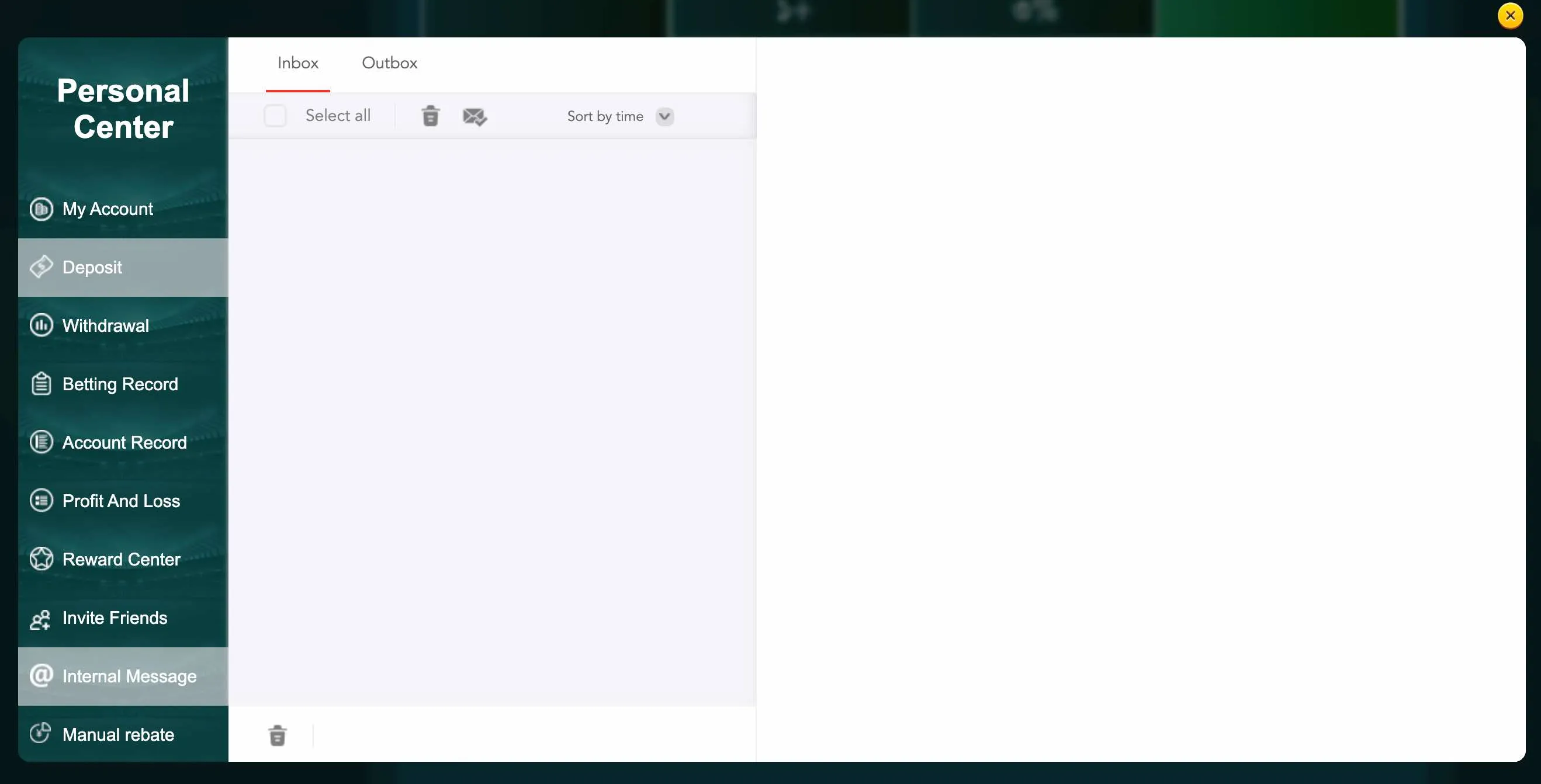
  2. EK333 internal messages

    Enter the phone number you used during registration, type your password, optionally tick Remember me and press Login. If the data is correct, you will be redirected to the lobby and can see internal messages, rewards and account menu.

Ways to log in to EK333

Casino EK333 supports several authorisation options so that players from Bangladesh can choose the most convenient method.

Login with mobile number and password

The main way is classic sign in via mobile number and password. During registration you connect an 11 digit local number, for example with operator from Dhaka or Chittagong. The same number is used for login and recovery.

This method is stable and independent from third party services. If you change your phone, you can still log in from any browser, as long as you remember number and password. For extra protection it is recommended to enable two factor verification, which adds an OTP code on top.

Login via Google or Facebook

EK333 also offers quick login via Google or Facebook. One tap connects your account to the social profile and skips manual password input.

This is practical for players who hate long forms, but remember that losing access to Facebook or Gmail will also make login harder. For safety link your social account only on personal devices and still keep the standard password updated in the EK333 profile settings.

Login from mobile app

Many users in Bangladesh prefer the EK333 mobile app for Android or iOS. After first authorisation the app can store your session and support fast re entry with PIN or biometrics on the device.

Once installed from the official download page, the app lets you tap Login on the start screen, type your phone and password only once, then use fingerprint or Face ID for repeat access. This way you avoid retyping data in public places and keep sessions shorter and safer.

Logging in from different devices

Casino EK333 is optimised for a wide range of devices often used in Bangladesh, from budget Android phones to laptops in internet cafes.

Desktop and laptop access

On Windows or macOS you can log in using any modern browser. After successful sign in EK333 keeps the session until you press Sign out, clear cookies or stay inactive for a long time.

Desktop access is comfortable for long slot sessions or live casino, because the lobby and tables are easier to view on a large screen. Many players also prefer to manage withdrawals and banking details from a laptop for better overview of forms.

Mobile browser on Android and iOS

If you do not want to install the app yet, the mobile browser version offers the same login flow. The login button is always at the top. After authorisation you can save the page to home screen and use EK333 almost like a PWA.

The site adapts to slower mobile connections typical for rural regions. Forms load quickly, and captcha rarely appears, which makes login smoother even on unstable network.

EK333 app login specifics

Inside the app, login works faster thanks to preloaded forms. The system can remember your device and shorten the security checks. Still, for important actions like new withdrawals or changes to e wallet details the app may request you to re enter password or OTP.

Sign in and continue playing

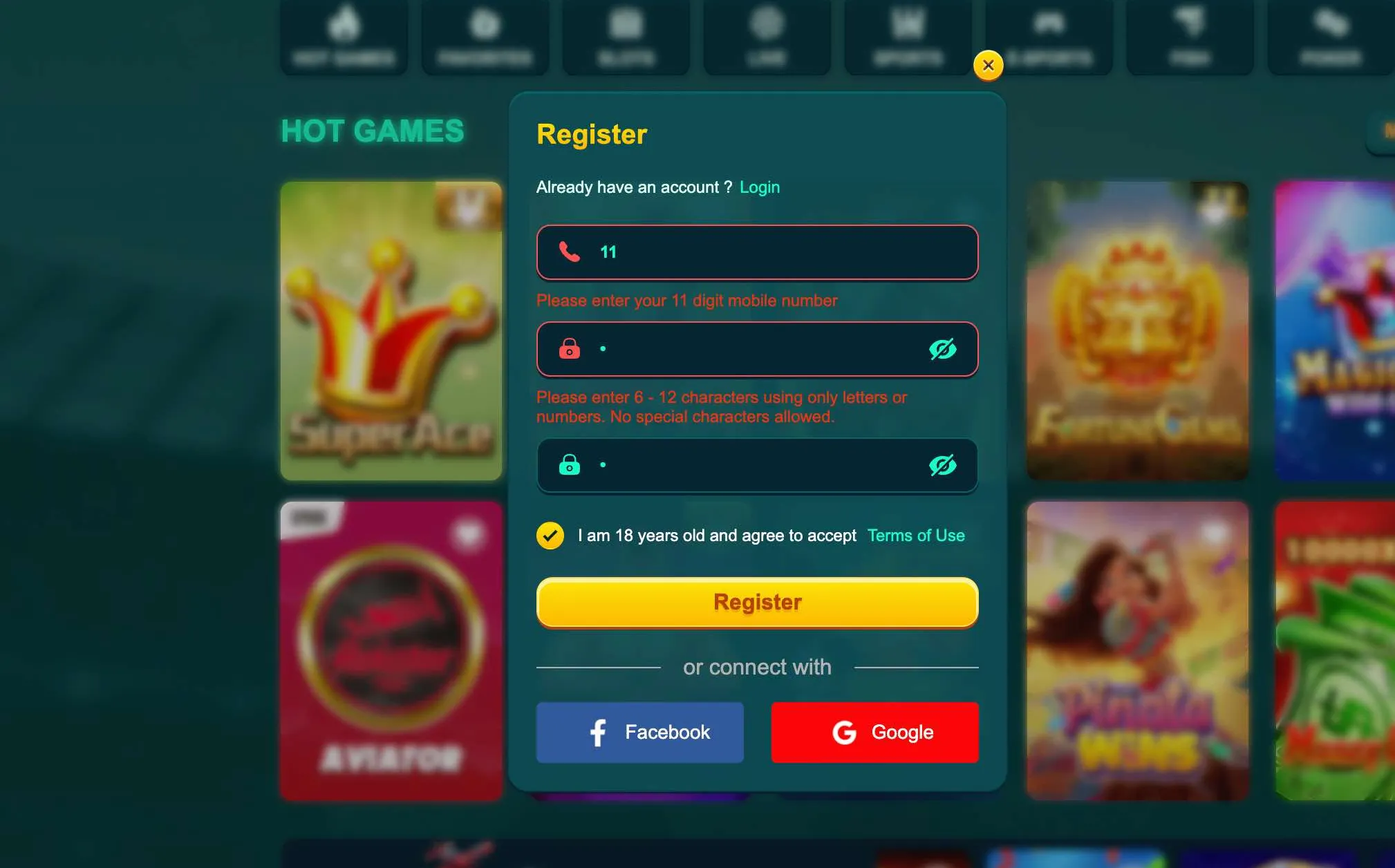
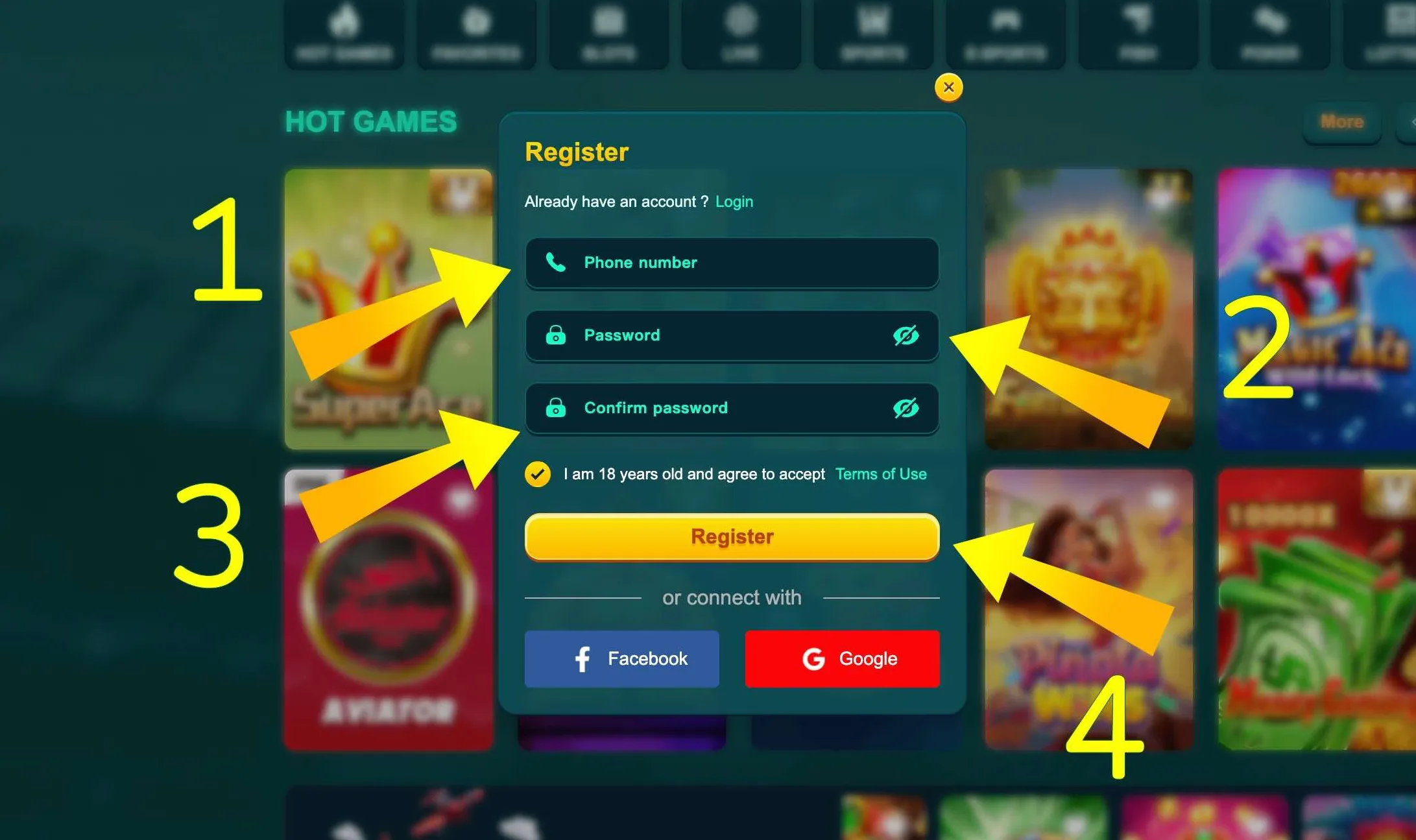
EK333 registration form with errors

Recovering access if EK333 login fails

Even careful players sometimes forget passwords or lose access to old phone numbers. EK333 provides several tools to get back into the account without stress. First, use the Forgot password link under the login form. You will be asked to enter your registered phone number and receive a reset code via SMS or email. Follow the instructions, set a new password that is 6 to 12 characters long with no special symbols, then try to login again from the same device.

If SMS does not arrive, check that the phone has network coverage, that the SIM is active and that you entered the correct country code. Sometimes it helps to wait a few minutes or request the code again. If you changed your number and cannot receive messages at all, contact support through live chat and be ready to pass KYC verification with your national ID. After confirmation the team can update your contact data.

EK333 registration password rules

Rules for new EK333 passwords

When you reset the password, EK333 checks that it follows basic security rules. The system accepts strings from 6 to 12 characters with numbers and letters only. Special symbols are blocked to avoid technical issues and to keep compatibility with older devices.

Use a different password from your social networks and banking apps. Avoid simple combinations like 123456 or your birth date that friends in Bangladesh can easily guess. A good pattern is to take two words and mix them with digits, for example a city name and part of your phone number. Never share the new password with anyone claiming to be customer support - real EK333 staff will never ask for it.

Typical EK333 login problems and quick checks

Even on a stable platform mistakes happen. Before you panic, go through a short checklist to solve most login issues yourself.

Wrong password or phone number

If EK333 shows an error that credentials are invalid, first check the phone number format. It must have 11 digits without spaces. Many users accidentally add a leading zero or miss one digit, especially when they change SIM cards.

Then verify Caps Lock and language on the keyboard if you are on PC. Password is case sensitive, so even a single wrong letter will cause a failure. Try to type it slowly in a notepad first and then copy into the form.

If you tried multiple times and still cannot enter, use the reset flow instead of random guessing. Too many failed attempts can temporarily lock the account for security reasons.

Network and device issues

Sometimes the login problem is not with Casino EK333 but with the connection. Weak mobile internet, overloaded Wi Fi in a shared hostel or office firewall may interrupt the authorisation process.

To test this, open any other site from the same device. If everything is slow, change the network or restart the router. If only EK333 does not load, try another browser or switch from browser to mobile app.

Clearing cache and cookies can also help when forms behave strangely or the site constantly logs you out.

Security of EK333 login and 2FA

Login is a key point where your casino balance meets the internet, so security matters. Casino EK333 uses encrypted connection and additional checks to protect users from Bangladesh and other regions.

Two factor authentication and device control

In account settings you can enable two factor authentication. After that, each new login requires both password and one time code from SMS or email. This makes it very hard for attackers to enter even if they somehow know your password.

EK333 tracks new devices and unusual IP addresses. If you usually play from Dhaka and suddenly log in from another country, the system may ask for extra confirmation or temporarily freeze withdrawals until you confirm identity. This helps to prevent fraud with stolen accounts or phones.

Practical safety tips for players

Security tools are efficient only if you use them correctly. Follow a few simple practices:

  • Log in only through official links and bookmarks
  • Do not share codes from SMS or email with anyone
  • Avoid signing in from public computers in cafes or libraries
  • Always log out at the end of session on shared devices
  • Keep the EK333 app updated to the latest version

When something looks suspicious, for example you see bets not made by you in the history, contact support immediately via live chat or hotline. Quick reaction often helps to freeze activity and save funds.

Keep your EK333 account safe - use secure login, enable two factor codes and access your games only from trusted devices.

What opens after successful login

When you log in correctly, Casino EK333 unlocks the full dashboard. For many players this moment feels like entering a personal control panel for all gaming activity.

Key sections available after login

Right after sign in you can access:

  • My Account with personal details and security settings
  • Deposit menu with bKash, Nagad, Rocket and bank transfer options
  • Withdrawal page with linked wallets and transaction password
  • Betting Record to track all stakes across slots, live tables and sports
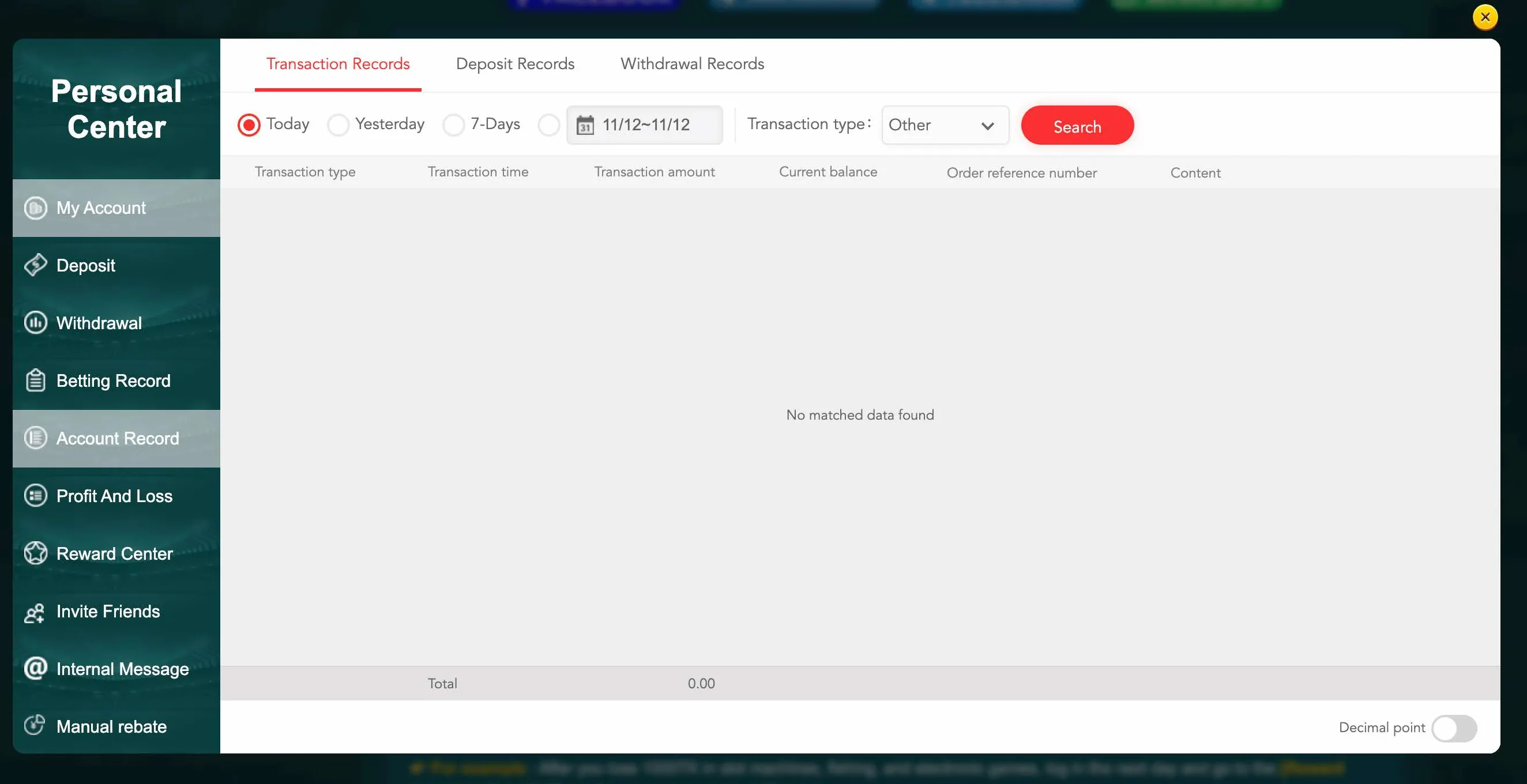
  • Account Record with a ledger of deposits, bonuses and withdrawals
  • Reward Center where you claim cashback, rescue funds and vouchers
  • Invite Friends area with referral statistics and commission levels

These sections are hidden for guests to protect privacy. Only the owner with correct login sees full financial and gaming history.

Example of account analytics

To understand how EK333 organises data, look at the main statistics screens you can open after authorisation.

Section What you see and control
Betting Record All bets filtered by date and game
Account Record Deposits, withdrawals, bonus usage
Profit and Loss Overview of expenses and income

Access to such analytics helps you keep control over entertainment budget and follow responsible gaming principles, which EK333 actively supports.

EK333 account record screen

Account Record in EK333 shows detailed deposits, withdrawals and adjustments after login, helping you track every taka.

EK333 login, KYC and payments

At some point, especially when withdrawals in BDT grow, EK333 may ask you to complete KYC. This is a standard requirement for legal platforms with First Cagayan licence and local presence in Bangladesh.

When KYC appears and how it affects login

Verification usually activates when:

  • Total deposits or withdrawals reach certain thresholds
  • System detects unusual behaviour or device change
  • You request manual help with account recovery

In such cases you might be redirected to an upload form after login or even see a message that account is temporarily limited until KYC documents are provided. Provide clear photos of your NID or passport and sometimes a selfie with the document.

Once verification is complete, login works as usual, but withdrawals to bKash, Nagad or Rocket become even more secure because they are tied to verified identity data.

Login and access to payments

For every financial action EK333 checks that you are logged in and have permission. Without authorisation you cannot open deposit or withdrawal forms, see bank details or edit linked wallets.

Sometimes the system will ask you to re enter password or transaction password even inside an active session. This double check protects your BDT balance if someone gets temporary physical access to your phone or laptop.

Log in to manage deposits and withdrawals

EK333 login FAQ

I cannot find the EK333 login button. Where is it located?

On desktop the Login button sits in the top right corner of the home page and all public sections. On mobile browser it is also at the top, either in the main bar or inside a compact menu icon. In the app you see Login on the first screen before entering the lobby.

What data do I need to log in to Casino EK333?

For standard login you need the mobile number used during registration and your password. Optionally you can sign in via Google or Facebook if you linked them before. When two factor authentication is enabled, you also need the one time code from SMS or email.

What should I do if I forgot my EK333 password?

Use the Forgot password link under the login form. Enter your registered phone number and follow the reset steps. You will receive a code and can set a new password. If you no longer have access to the number, contact support and be ready to pass identity verification with your national ID.

Why does EK333 say my phone number is invalid?

Most likely the number is not 11 digits or contains spaces. Make sure you enter it exactly as during registration and avoid extra leading zeroes or country codes. If the problem remains, check that you really registered this number and did not mix it with another SIM.

Can I stay logged in on several devices at the same time?

Technically you can sign in on phone and laptop at once, but it is safer to keep active session only on personal devices you control. If the system detects suspicious multi device activity, it may ask for extra confirmation or log you out to protect the account.

Is it safe to log in to EK333 from public Wi Fi in Bangladesh?

Connection is encrypted, but public networks still carry risks. Avoid logging in from shared computers and unsecured Wi Fi in cafes or campuses. If you must do it, log out after the session and do not save the password in the browser.

How do I enable two factor authentication for EK333 login?

Open My Account after login, go to security settings and activate two factor verification. Usually you choose between SMS or email codes. After that every new login from unknown device requires both password and one time code.

The EK333 page keeps reloading and I cannot log in. What now?

First check your internet connection by opening other sites. Then clear browser cache and cookies or try another browser. If the problem appears only on the web, install the EK333 mobile app from the official download page and log in there.

Can I log in to EK333 directly from the mobile app?

Yes. Download the official application, open it and tap Login. Use the same phone number and password as on the website. After first sign in you can set PIN or biometric unlock for faster and safer access.

How do I log out of EK333 on all devices?

In Personal Center there is a Sign out option. Use it on each device where you logged in. If you think someone else might have access, change your password and ask support to terminate all active sessions linked to your account.

After a correct EK333 login you get full control over your profile, limits and payouts in BDT from any device you trust.

Use secure login on Casino EK333 and enjoy a smooth experience across web and mobile with fast access to your favourite games.